Get started
Installation
Requirements
| Blender | 5.0.0 or newer |
| Extension id | izom_propui |
| Version | 1.1.3 |
| License | GPL-3.0-or-later |
Install the extension
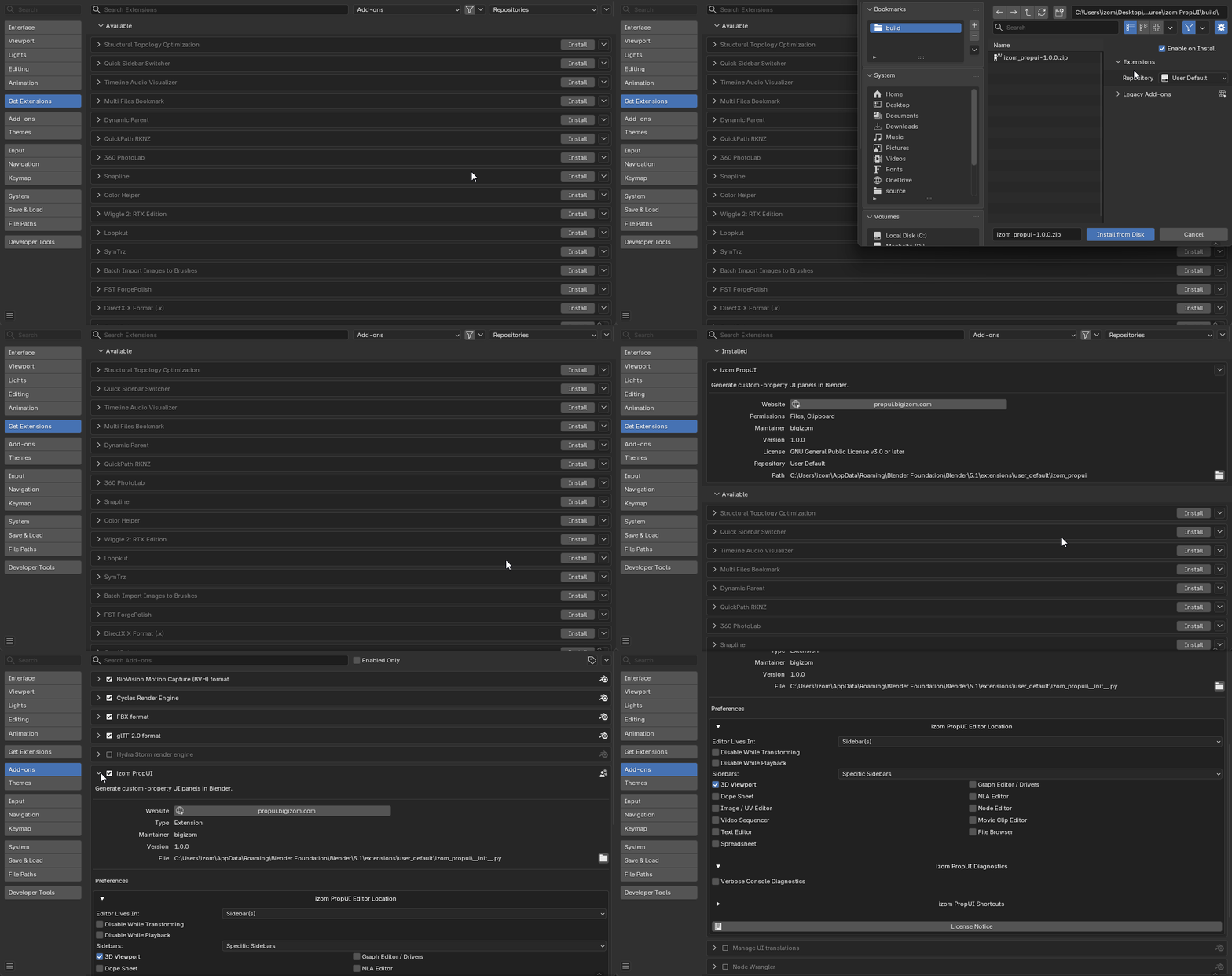
- Get the built extension zip from the right store page. Superhive has one product page for every edition. On Gumroad, Free and Full are on the main page and Rigify has its own page. See the Buy page.
- In Blender, install the zip through the extension / add-on installer.
- Enable izom PropUI.
What it uses
PropUI installs and runs normally — there's nothing to grant or toggle. For transparency, the extension declares the access it uses:
- Files: for importing and exporting setup JSON, bundle ZIP files, and
generated
.pyscripts. - Clipboard: for copying and pasting setup JSON, editor settings JSON, and entry presets.
Note
These are only used by PropUI's own import/export and copy/paste tools. See Import / Export for what they drive.
After enabling
By default the PropUI editor appears in the 3D Viewport sidebar. You can move it to other sidebars or the Properties editor — see Finding the editor.
Ready to build something? Head to the Quickstart.
Running portable scripts
A generated UI script is Python stored in a Blender Text datablock. If you import a generated UI script from someone else, you are running their Python. Only run scripts you trust.